
In the fast-paced world of logistics, warehousing, and retail, devices like the Symbol (now Zebra) TC70 and TC75 series are indispensable. Their reliability hinges on one critical component: the battery. This article provides a comprehensive guide to selecting, using, and maintaining the right battery to ensure your mobile computers operate at peak performance all day, every day.
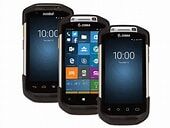
1. Identification and Key Models
The TC70/TC75 series scanners are powered by specific, high-capacity rechargeable lithium-ion battery packs. The most common and widely available official model is the Zebra BT-000318 battery pack. You may also find it under the part numbers 023.B0010.0181 or 82-171249-02.
These batteries are designed as a sleek pack that attaches to the back of the handheld device, providing a secure fit and seamless power integration.
2. Technical Specifications and Variants
Choosing Capacity: A standard 4620mAh battery is sufficient for most 8-hour shifts. Opt for a higher-capacity model (like the 6720mAh variant) if your workers use the scanner continuously with the screen and scanner active, or if you operate over multiple shifts without convenient charging opportunities.
3. Purchasing and Compatibility Guide
You have two main choices when replacing a battery:
Original Zebra Batteries: Recommended for guaranteed quality, safety, and optimal performance. They are engineered to work perfectly with the device’s charging circuitry and thermal management.
Compatible Third-Party Batteries: These are more affordable and widely available from various suppliers. While many offer good performance, ensure they come from a reputable vendor and have necessary safety certifications. Be cautious of prices that seem too good to be true, as they may indicate inferior cells or lack of protection circuits.
Critical Check: Always confirm that the battery model (e.g., BT-000318) is listed as compatible with your exact device model (e.g., TC75) before purchasing.
4. Best Practices for Use and Maintenance
Proper care extends battery life and ensures safety:
Use the Official Charger: Always use the Zebra-approved single or multi-bay charger. It manages the correct charging algorithm to prevent overcharging.
Avoid Extreme Temperatures: Do not leave devices or batteries in direct sunlight or in freezing vehicles for prolonged periods. Charge batteries at room temperature.
Storage: If storing a scanner or spare battery for more than a month, charge the battery to about 50% first.
Replacement Cycle: Plan to replace batteries every 18-24 months under typical daily use, as capacity will naturally degrade over time.
Maximizing Uptime in Your Operations
The right battery strategy is more than a purchase—it’s a operational plan. Investing in quality batteries, keeping charged spares readily available, and training staff on simple handling practices will minimize device downtime. This ensures your team remains productive, efficient, and connected, keeping your business operations running smoothly from the first scan to the last.